


Truecaller has introduced a new Family Protection feature that helps users protect their loved ones from scam calls. The feature allows one person in the family to monitor suspicious calls and step in if needed, even remotely ending a call that looks like fraud.
According to Truecaller’s Chief Product Officer, Kunal Dua, the update reflects how common phone scams have become and how they often target vulnerable users, especially those who may not recognise warning signs.
The feature is now rolling out globally, including in India, where Truecaller has its largest user base.
How the Truecaller Family Feature Works
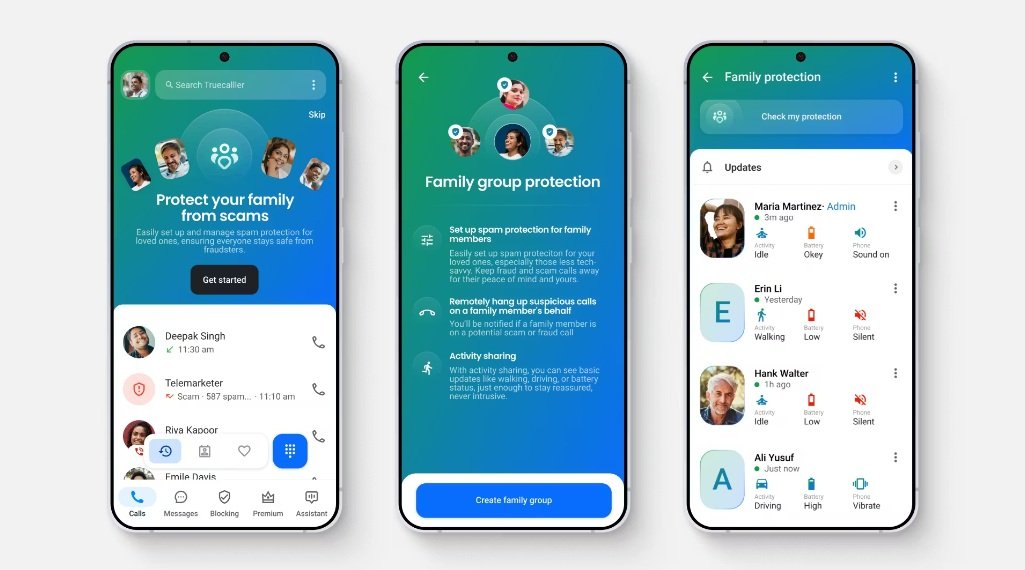
The system is built around a family group inside the app, where one person acts as the administrator and monitors scam alerts for everyone in the group.
1. Create a Family Group
- Open the Truecaller app and create a group that includes your family members or close contacts.
- One person will be assigned as the group admin, who will manage alerts and protection features.
2. Invite Family Members
- Send invites to your relatives through the app. Once they join, their phones become part of the shared protection system.
- This connection allows the admin to receive alerts about suspicious calls on their devices.
3. Get Alerts for Scam Calls
- When Truecaller detects a potential fraud call, the admin receives a notification.
- This helps the admin quickly check whether the call looks suspicious and decide if action is needed.
4. Remotely End Suspicious Calls
- If the admin believes a call is a scam, they can remotely disconnect the call from their own device.
- This is especially useful in situations where scammers try to pressure or manipulate the victim during the call.
5. Block Scam Numbers for Everyone
- The admin can block specific numbers or even entire international calling codes.
- These blocked numbers are shared across the group, helping prevent similar scam calls from reaching other members.
6. Understand Privacy Limits
- Truecaller has added privacy safeguards to the feature.
- The admin cannot see personal call logs, messages, or conversations. They only receive alerts when a call is flagged as suspicious by the system.
Why This Feature Matters
Phone scams are growing rapidly in both scale and complexity. In India alone, Truecaller reports detecting over 7.7 billion fraud calls in the past year.
Scammers are also using more advanced tactics. One example is the “digital arrest” scam, where callers pretend to be police officers and pressure victims into sharing sensitive information or sending money.
To combat this, Truecaller is also exploring AI-based tools that could analyze conversations in real time and automatically disconnect calls if scam-related patterns are detected.
A Smarter Way to Protect Families
The new Family feature marks a shift in how Truecaller approaches scam prevention. Instead of relying only on individual awareness, it introduces a shared protection system where family members can look out for each other.
For users with elderly relatives or less tech-savvy family members, this feature adds an extra layer of safety against increasingly sophisticated phone scams.